Integrate with QNAP NAS
What is QNAP NAS?
QNAP Systems, Inc. is a Taiwanese corporation that specializes in network-attached storage appliances used for file sharing, virtualization, storage management and surveillance applications.
Connecting a QNAP NAS to an LDAP directory is a little unusual because it is not well documented what QNAP does behind the scenes.
Preparation
The following placeholders are used in this guide:
ldap.baseDNis the Base DN you configure in the LDAP provider.ldap.domainis (typically) a FQDN for your domain. Usually it is just the components of your base DN. For example, ifldap.baseDNisdc=ldap,dc=goauthentik,dc=iothen the domain might beldap.goauthentik.io.ldap.searchGroupis the "Search Group" that can see all users and groups in authentik.qnap.serviceAccountis a service account created in authentik.qnap.serviceAccountTokenis the service account token generated by authentik.
This documentation lists only the settings that you need to change from their default values. Be aware that any changes other than those explicitly mentioned in this guide could cause issues accessing your application.
Create an LDAP Provider if you don't already have one set up. This guide assumes you will be running with TLS. See the LDAP provider docs for setting up SSL on the authentik side.
Remember the ldap.baseDN you configured for the provider, as you'll
need it in the SSSD configuration.
Create a new service account for all of your hosts to use to connect
to LDAP and perform searches. Make sure this service account is added
to ldap.searchGroup.
The QNAP LDAP client configuration has issues with passwords that are too long. Maximum password length: <= 66 characters.
Deployment
Create an outpost deployment for the provider you've created above, as described here. Deploy this Outpost either on the same host or a different host that your QNAP NAS can access.
The outpost will connect to authentik and configure itself.
NAS configuration
The procedure is a two-step setup:
- QNAP Web UI: used to set up and store initial data, especially the encrypted bind password.
- SSH config edit: used to adapt settings so the NAS can communicate with the authentik LDAP outpost.
The config edit is essential, as QNAP relies on certain non-configurable settings.
The search for users and groups relies on a fixed filter for
objectClass in posixAccount or posixGroup classes.
Also by default the search scope is set to one (singleLevel), which can be
adapted in the config to sub (wholeSubtree).
Sample LDAP request from QNAP
Default search for users
Scope: 1 (singleLevel)
Deref Aliases: 0 (neverDerefAliases)
Size Limit: 0
Time Limit: 0
Types Only: false
Filter: (objectClass=posixAccount)
Attributes:
    uid
    userPassword
    uidNumber
    gidNumber
    cn
    homeDirectory
    loginShell
    gecos
    description
    objectClass
Default search for groups
Scope: 1 (singleLevel)
Deref Aliases: 0 (neverDerefAliases)
Size Limit: 0
Time Limit: 0
Types Only: false
Filter: (objectClass=posixGroup)
Attributes:
    cn
    userPassword
    memberUid
    gidNumber
QNAP Web UI
Configure the following values and "Apply"
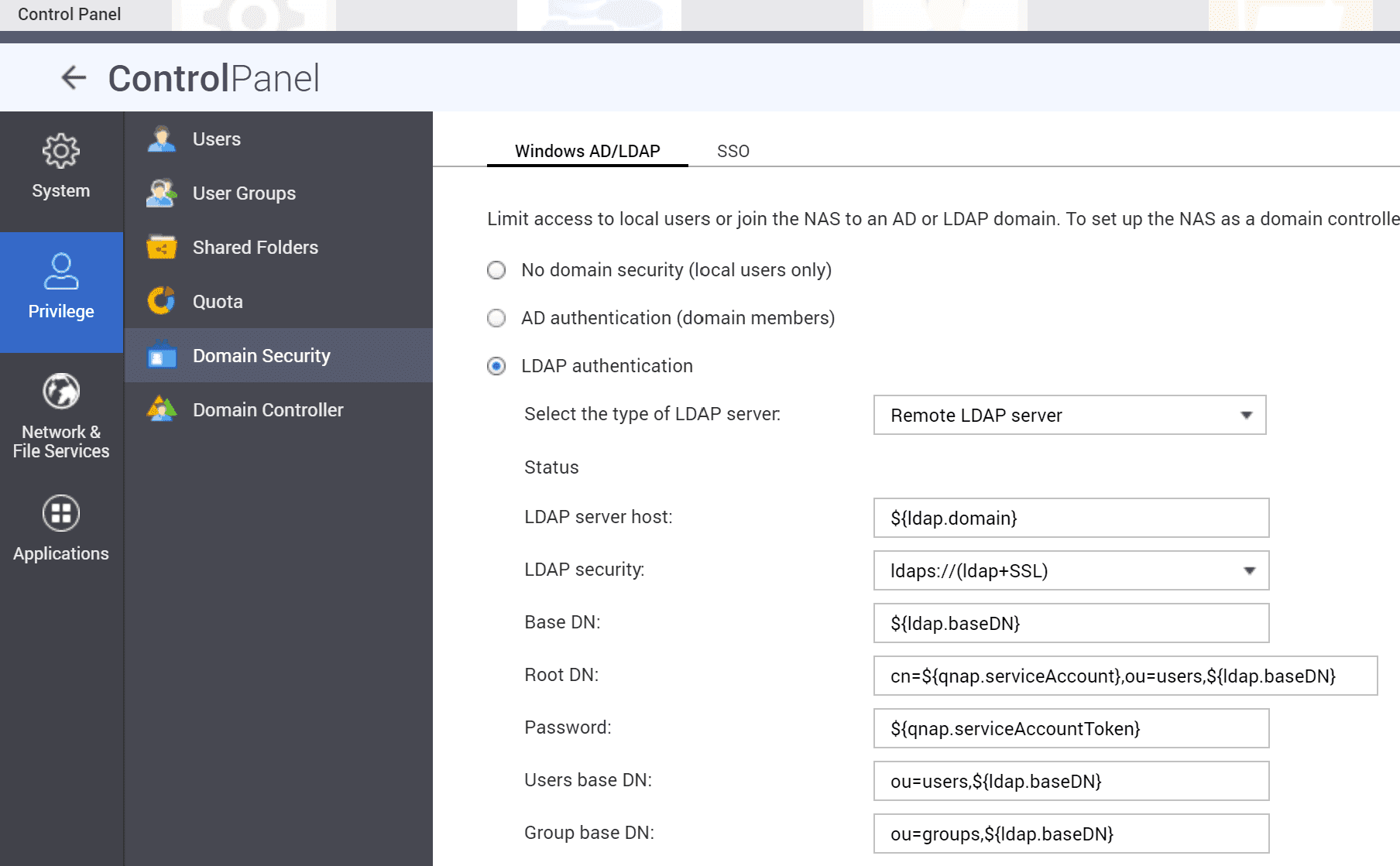
With each save (Apply) in the UI the /etc/config/nss_ldap.conf will be overwritten with default values.
The UI configuration is necessary because it saves the encrypted password
in /etc/config/nss_ldap.ensecret.
SSH
Connect your QNAP NAS via SSH. First stop the LDAP Service:
/sbin/setcfg LDAP Enable FALSE
/etc/init.d/ldap.sh stop
Edit the file at /etc/config/nss_ldap.conf:
host                        ${ldap.domain}
base                        ${ldap.baseDN}
uri                         ldaps://${ldap.domain}/
ssl                         on
rootbinddn                  cn=${qnap.serviceAccount},ou=users,${ldap.baseDN}
# authentik has no memberUid therefore switch to
nss_schema                  rfc2307bis

# remap object classes to authentik ones
nss_map_objectclass         posixAccount    user
nss_map_objectclass         shadowAccount   user
nss_map_objectclass         posixGroup      group

# remap attributes
# uid to cn is essential otherwise only id usernames will occur
nss_map_attribute           uid             cn
# map displayName information into comments field
nss_map_attribute           gecos           displayName
# see https://ldapwiki.com/wiki/Wiki.jsp?page=GroupOfUniqueNames%20vs%20groupOfNames
nss_map_attribute           uniqueMember    member

# configure scope per search filter
nss_base_passwd             ou=users,${ldap.baseDN}?one
nss_base_shadow             ou=users,${ldap.baseDN}?one
nss_base_group              ou=groups,${ldap.baseDN}?one

tls_checkpeer               no
referrals                   no
bind_policy                 soft
timelimit                   120
tls_ciphers                 EECDH+CHACHA20:EECDH+CHACHA20-draft:EECDH+AES128:RSA+AES128:EECDH+AES256:RSA+AES256:!MD5
nss_initgroups_ignoreusers  admin,akadmin
Now start the LDAP service:
/sbin/setcfg LDAP Enable TRUE
/etc/init.d/ldap.sh start
To see if the connection is working, type
# list users
$ getent passwd
The output should list local users and authentik accounts.
# list groups
$ getent group
The output should list local and authentik groups.